You're Not Giving Anyone Your Password: How Apps Like Youtilitics Read Your Utility Data Safely
If you've ever tried to connect an app to your electric, gas, or water account, you've probably hit a screen that looks like this:
"YourUtility.com wants to share data with [App Name]. Allow?"
Then you get bounced to your utility's own website, you log in there, and a moment later you land back on the app — connected, without ever typing your utility password into the app itself.
That process has a name: OAuth2. It sounds like tech jargon, but it's one of the most important consumer-protection tools built into the modern internet, and it's exactly how Youtilitics — and thousands of other apps you already trust, like the ones that let you check your bank balance in Mint or sign into a website "with Google" — get access to your data without ever seeing your password.
This article explains, in plain English, what OAuth2 is, how it moves your utility data from your utility company to an app like Youtilitics, why it's considered secure, and exactly what data does (and doesn't) get shared.
The Problem OAuth2 Was Invented to Solve
Before OAuth2 became standard, if you wanted an app to access your account somewhere else, there was only one option: you typed your actual username and password into the app, and the app logged in pretending to be you.
That created some real problems:
- The app now permanently knows your password. If that app ever gets hacked, your utility login is exposed too — and since a lot of people reuse passwords, potentially your email or bank login as well.
- You can't limit what the app sees. Once it's logged in as you, it can see everything your account can see — billing details, payment methods, personal info, all of it.
- You can't easily undo it. The only way to cut off access is to change your utility password entirely, which is a hassle and breaks every other app you'd connected.
OAuth2 fixes all three of these problems at once. It's a standard — used by essentially every major tech company (Google, Microsoft, Amazon, your bank, your utility company) — for letting App B access some of your data on App A's website, without App B ever touching your App A password.
How OAuth2 connects three parties
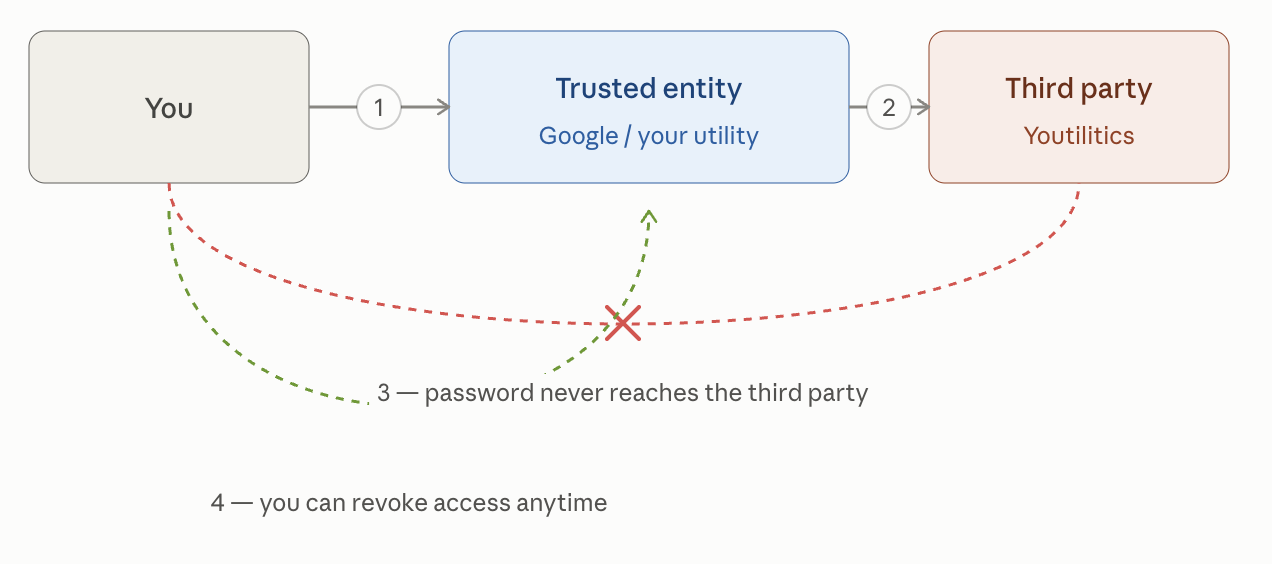
That's the OAuth2 trust triangle: you authenticate directly with the trusted entity (arrow 1 — similar to what you do with "Sign in with Google", or in our case, your utility), which then shares a limited slice of data with the third-party app (arrow 2 — Google would share your email and profile picture, or in our case, usage data). The dashed red line (3) marks the path your password never takes — it stays entirely inside the trusted entity's own login page (e.g. between you and your utility). The dashed green line (4) shows that you can cut off access at the trusted entity at any time, no password change required.
Youtilitics, as a OAuth2 third party, does not have access to your account credentials and will only receive data covered by the scope you accept and give your utility.
How It Actually Works, Step by Step
Here's the exact sequence when you connect your utility to an app like Youtilitics:
- You click "Connect my utility." Youtilitics sends you over to your utility company's own website — not a lookalike page, the real one, with the real web address in your browser's address bar.
- You log in on your utility's own site. This is the important part: you are typing your username and password into your utility's website, the same one you already use to pay your bill. Youtilitics never sees this screen, and the password never passes through Youtilitics' servers at all.
- Your utility asks you to confirm what you're sharing. You'll typically see a screen listing exactly what's being requested — for example, "your electricity usage history" — and you approve or deny it.
- Your utility hands Youtilitics a token, not a password. Once you approve, your utility generates a special digital "access pass" (called a token) and gives it to Youtilitics. Think of it like a hotel key card: it lets Youtilitics open one specific door — your usage data — but it can't be used to change your account, see your payment method, or log in anywhere else. And unlike your password, if that key card is ever lost or stolen, the hotel (your utility) can deactivate just that one card without changing anyone's room locks.
- Youtilitics uses the token to pull your data. From then on, Youtilitics periodically checks in with your utility using that token and downloads your usage readings — kilowatt-hours, gallons, therms — on a schedule, automatically, in the background.
- You stay in control the whole time. You can go back to your utility's website (or Youtilitics' settings) and revoke that access at any moment. The token stops working immediately. No password change required, and nothing else connected to your utility account is affected.
The technical name for the specific version utilities use is Green Button Connect My Data (CMD) — it's a government-backed data-sharing standard (more on that below), and it's built on top of OAuth2.
Why This Is Actually Secure
A few things make this meaningfully safer than the old "give the app your password" method:
- Your password only ever exists in one place: your utility's own login page. Youtilitics never receives it, never stores it, and technically can't leak what it never had.
- The access token is limited in scope. Utilities typically only authorize sharing of usage data — meter readings over time — not your billing history, payment method, Social Security number, or account balance. The app is handed a narrow slice of information, not a master key to your account.
- Tokens can expire or be revoked instantly. Unlike a password (which keeps working everywhere until you manually change it), a token can be set to expire automatically, and you can kill it with one click at any time — from your utility's site or from within the connected app.
- It's an audited, industry-wide standard, not a one-off workaround. OAuth2 is the same protocol behind "Sign in with Google," bank account aggregators like Plaid, and countless enterprise systems. It has been scrutinized by security researchers for over a decade. Utilities didn't invent a custom, unproven system for this — they adopted the same well-tested approach everyone else uses.
- You can see, and limit, exactly what's shared. The consent screen at your utility tells you what data category you're authorizing. You're not signing a blank check.
Put simply: instead of handing over your house keys, you're handing over a key card that only opens the mailbox, that you can cancel from your phone whenever you want.
What's Actually Inside the Data (and What Isn't)
The data format utilities use is called Green Button data, introduced through a White House initiative back in 2011 and built on a technical standard called ESPI (Energy Services Provider Interface). Whether you download it manually ("Download My Data") or connect it automatically through OAuth2 ("Connect My Data"), the contents are the same.
What's in it:
- Interval usage readings — how many kilowatt-hours, gallons, or therms you used, broken into time chunks (often hourly)
- Timestamps for each reading
- Basic account/meter identifiers needed to match the data to the right service address
What's not in it:
- No banking information, card numbers, or payment history
- No Social Security number or government ID info
- No password or login credentials of any kind
- No home address details beyond what's needed to identify the meter (and typically nothing sent to Youtilitics beyond usage numbers)
- No information about what is using the electricity or water — Green Button data doesn't know if you ran the dishwasher or the AC, it just knows total flow at the meter
That last point matters: a leak-detection alert or a "your usage looks unusually high" email isn't magic — it's just math applied to a stream of numbers (gallons or kilowatt-hours per hour), compared against your own normal patterns.
Bringing It Back to Youtilitics
Youtilitics is a real, independently built company based in California — not a division of a utility, not a hardware company, and not backed by a big ad-tech budget. It was started by a dad in Ventura, California who got tired of squinting at a monthly water and electric bill trying to figure out why it was high, whether an irrigation valve had gotten stuck, or whether a "smart" EV charging schedule was actually doing anything. There was no simple way to just see the data and get told when something looked wrong — so he built one.
That origin shows up directly in how the product handles your data: no hardware to install, no username or password stored on Youtilitics' servers when a Green Button connection is available, one-click revocation, and a strict rule against showing you numbers the data can't actually support (no invented "you saved $47 this month" claims — just the usage patterns the meter data actually shows).
If your utility supports Green Button, connecting takes a couple of minutes, your password never leaves your utility's own website, and you can disconnect it just as easily as you connected it
Start saving on your bill.
Get alerts when your energy usage looks abnormal — free trial, no card required.